
Introduction
A quiet shift is happening in the business world.
It’s not about new apps. It’s not about new marketing trends.
It’s about infrastructure.
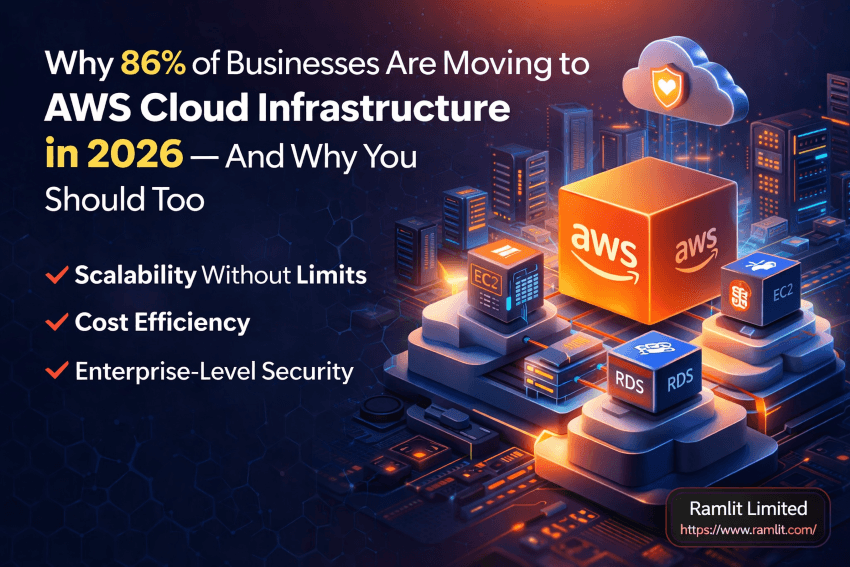
In 2026, over 86% of businesses are moving to cloud platforms like AWS — and it’s not just because it’s “modern.”
It’s because traditional systems are breaking under pressure.
- Servers crash during high traffic
- Scaling takes too long
- Security risks are increasing
- Maintenance costs keep rising
Meanwhile, businesses on AWS are moving faster, scaling instantly, and operating with far less risk.
So the real question isn’t:
👉 “Should you move to the cloud?” 👉 It’s: “How long can you afford not to?”
In this guide, you’ll understand why AWS is dominating cloud infrastructure in 2026 — and how it can directly impact your business growth, performance, and security.
What Is AWS Cloud Infrastructure?
Amazon Web Services (AWS) is a cloud computing platform that allows businesses to:
- Host applications
- Store data
- Scale infrastructure
- Secure systems
All without owning physical servers.
Instead of managing hardware, you focus on your business.
Why Businesses Are Rapidly Moving to AWS
1. Scalability Without Limits
Traditional hosting struggles with growth.
AWS solves that.
With AWS, you can:
- Scale servers automatically
- Handle traffic spikes instantly
- Expand globally without infrastructure changes
👉 Your system grows with your business.
2. Cost Efficiency
With traditional infrastructure:
- You pay for hardware
- You pay for maintenance
- You pay for downtime
With AWS:
✔ Pay only for what you use ✔ No upfront hardware cost ✔ Optimized resource usage
3. High Availability & Reliability
Downtime = lost revenue.
AWS provides:
- Multiple data centers (regions)
- Automatic failover
- Load balancing
👉 Your system stays online — even during failures.
4. Enterprise-Level Security
Security is one of AWS’s strongest advantages.
Features include:
- Data encryption
- IAM (Identity & Access Management)
- Network security controls
- DDoS protection
👉 Your infrastructure is protected at a global level.
5. Faster Deployment & Innovation
Launching a product on traditional infrastructure takes time.
AWS enables:
- Instant server setup
- Automated deployment pipelines
- Continuous integration
👉 You go from idea → production faster.
Key AWS Services You Should Know
1. EC2 (Elastic Compute Cloud)
Virtual servers for running applications.
2. S3 (Simple Storage Service)
Highly secure cloud storage.
3. RDS (Relational Database Service)
Managed databases (MySQL, PostgreSQL, etc.)
4. CloudFront
Content Delivery Network (CDN) for fast global performance.
5. Lambda (Serverless)
Run code without managing servers.
6. IAM
Secure access management system.
Real Business Impact of AWS
Before AWS
- Slow performance
- Frequent downtime
- Limited scalability
- High maintenance cost
After AWS
- Faster load times
- Stable uptime
- Easy scaling
- Reduced operational cost
👉 This directly increases:
- User experience
- Conversion rates
- Revenue
Why AWS Is Better Than Traditional Hosting
| Feature | Traditional Hosting | AWS |
|---|---|---|
| Scalability | Limited | Unlimited |
| Cost | Fixed | Pay-as-you-go |
| Security | Basic | Advanced |
| Speed | Moderate | High |
| Reliability | Medium | Very High |
Who Should Use AWS?
AWS is ideal for:
Startups
- Fast launch
- Low cost
- Easy scaling
eCommerce Businesses
- Handle traffic spikes
- Secure transactions
SaaS Platforms
- Scalable backend
- Global reach
Enterprise Applications
- High performance
- Strong security
Common Mistakes Businesses Make
❌ Not Optimizing Costs
AWS can be expensive if misconfigured.
❌ Poor Architecture Design
Bad setup = poor performance.
❌ Ignoring Security Settings
Misconfiguration can lead to vulnerabilities.
❌ No Monitoring System
Always track usage and performance.
Best Practices for AWS Implementation
✔ Use auto-scaling ✔ Enable monitoring (CloudWatch) ✔ Optimize resource usage ✔ Implement strong IAM policies ✔ Use CDN for faster delivery
Why You Should Migrate to AWS Now
Waiting has a cost.
- Competitors are scaling faster
- Customers expect better performance
- Security threats are increasing
👉 Early adopters win.
Quick Takeaways
- AWS is leading cloud infrastructure in 2026
- Offers scalability, security, and cost efficiency
- Improves performance and reliability
- Ideal for startups, SaaS, and enterprises
- Proper setup is critical for success
Call to Action (CTA)
Moving to AWS is not just a technical upgrade.
It’s a business decision.
If you want: ✔ Faster applications ✔ Better security ✔ Scalable infrastructure
Then AWS is the right choice.
💬 If you need help setting up or migrating your system to AWS — working with an expert can save time, reduce costs, and ensure a smooth transition.
FAQ Section
1. Is AWS suitable for small businesses?
Yes, AWS is highly scalable and cost-effective for small businesses.
2. Is AWS expensive?
It depends on usage. With proper optimization, it’s cost-efficient.
3. How long does migration take?
Depends on system size — from days to weeks.
4. Is AWS secure?
Yes, it offers enterprise-level security features.
5. Do I need technical skills?
Basic knowledge helps, but experts can manage setup and migration.
Final Thought
Cloud is no longer the future.
👉 It’s the present.
And AWS is leading that transformation.
The sooner you adapt — the faster your business grows. 🚀
Let's Work Together
Looking to build AI systems, automate workflows, or scale your tech infrastructure? I'd love to help.
- Fiverr (custom builds & integrations): fiverr.com/s/EgxYmWD
- Portfolio: mejba.me
- Ramlit Limited (enterprise solutions): ramlit.com
- ColorPark (design & branding): colorpark.io
- xCyberSecurity (security services): xcybersecurity.io