
Zapier vs Make vs n8n comes down to three questions, not thirty features: how you want to pay (per task, per operation, or per workflow run), how much control you need over your data, and who on your team will maintain the thing after the first week. Zapier is the fastest to start and the widest ecosystem, Make gives you a visual control room at a lower price, and n8n gives you ownership in exchange for engineering time.
Ramlit's engineering team builds and maintains automations on all three platforms for clients, and the question we hear most from founders is not "which is best?" but "which one will still make sense when we have ten times the volume?" This guide answers that question in plain business language, using a November 2025 StartupWise comparison by Eric Hunleyker as the starting point and the vendors' own pricing pages (checked August 2026) as the source of every number. One caveat up front: that video carries a Zapier affiliate link and crowns Zapier the winner. Ramlit has no affiliation with any of the three, and the honest answer depends on your operation.
The Digital Glue Analogy
Picture your business as an office where every department speaks a different language. Sales works in a CRM, finance lives in spreadsheets, support answers in a helpdesk, and marketing posts on five platforms.
Every day, someone copies information from one room to another: a new lead into the sheet, a paid invoice into the accounting tool, a support ticket into Slack. That copying is where hours, and errors, disappear.
Workflow automation platforms are the interpreters who walk between those rooms so your staff do not have to. All three tools do the same core job: something happens in one app (a trigger), and a chain of actions fires in other apps. A form is submitted, a row appears in a Google Sheet, a welcome email goes out, the sales channel in Slack gets a ping. Nobody touched a keyboard.
Where the three differ is how the interpreter works, what they charge you for each trip between rooms, and who is responsible when a trip fails at 2 a.m.
Zapier vs Make vs n8n at a Glance
Before the detail, here is the one-paragraph version Ramlit gives clients in a first call.
- Zapier — easiest to start, biggest app library (9,000+), bills per task, most expensive at high volume, compliance handled for you.
- Make — visual builder, strongest at branching and loops, bills per operation (everything counts), cheapest managed option at moderate volume, needs a capable owner.
- n8n — open-source and self-hostable, bills per workflow execution in the cloud, cheapest at scale, you own the data and the maintenance.
If you remember nothing else from this zapier vs make vs n8n comparison, remember that the three bill differently for the same work. Everything else follows from that.
Zapier: The Automatic Transmission
Zapier has been the default name in no-code automation for more than a decade. As of August 2026 its pricing page advertises more than 9,000 connected apps, the largest library in the category. If a tool has a login page, it is probably already on Zapier.
The product is built so that a non-technical person can ship a working automation in the first ten minutes. You pick a trigger, pick an action, map a few fields, and turn it on. The AI Copilot goes further: describe the workflow in one sentence and it drafts the steps for you. Two newer pieces, Tables (a lightweight database) and Interfaces (simple forms and dashboards), let a small team build an entire internal system without a developer.
How it bills. Zapier charges per task, and a task is a step that does real work: sending an email, updating a record, posting a message. Filters, formatting steps and tests are free. That matters more than it sounds, because it makes your monthly bill predictable. Current tiers: a free plan with 100 tasks a month and two-step workflows, Professional from $19.99 a month, Team from $69 a month, and a slider that runs from 100 to more than two million tasks. Annual billing saves 33%.
Where it fits. Teams with no engineers, fast-moving founders, and any company whose automation needs are wide (many apps) rather than deep (complex logic). The trade-off is cost at volume; per-task pricing is the most expensive of the three once you pass a few thousand tasks a month.
Make: The Visual Control Room
Open Make and you see a flowchart: circles for each step, lines showing where data flows, branches that split and merge. For a certain kind of operator this is addictive, because you can see your business logic. Routers send a lead down different paths depending on deal size. Iterators loop over every line item on an order. Arrays and nested data, which trip Zapier up, are Make's home turf.
That power costs learning time. You need to understand routers, filters, and how to reshape data between steps. Expect a week of tinkering before it feels natural.
How it bills. Make charges per operation, and every operation counts, including the step that checks whether new data exists and the test runs you make while building. A five-step workflow that Zapier bills as three tasks may cost Make seven or eight operations. The prices are lower to compensate: a free plan with 1,000 credits a month (and a 15-minute minimum interval between runs), Core at $12 a month for 10,000 credits, Pro at $21, Teams at $38, and a 15% discount for annual billing. Make lists more than 3,000 standard apps.
Where it fits. Operations with branching logic, e-commerce order handling, data clean-up jobs, and teams with one person who enjoys building. Budget for surprises in the first two months while you learn what counts as an operation.
n8n: The Automation You Own
n8n (pronounced "n-eight-n") is the open-source option, distributed under a fair-code license and available to self-host for free from GitHub, where it has passed 200,000 stars. You can run it on your own server, inside your own network, extend it with JavaScript or Python, and connect to any API that exists. Your data never leaves infrastructure you control.
For a developer this is freedom. For a business owner without one, it is a software project. The StartupWise video makes the point with a simple example: posting new YouTube videos to LinkedIn is one sentence in Zapier's Copilot, while in n8n you connect to the YouTube API, parse the response, call a language model for a caption, then authenticate against LinkedIn with your own token. It works, and you now own a small application that needs updates.
How it bills. n8n's cloud plans charge per workflow execution, not per step. One run of a 40-step workflow is one execution. Starter is €20 a month for 2,500 executions, Pro is €50 for 10,000, Business is €667 for 40,000 with a self-hosting option, and Enterprise is custom. Every plan includes unlimited users and workflows. Self-hosting is free in licence terms, but you pay in server costs, developer hours, security patches and backups.
Where it fits. Companies with an engineer on staff or a partner like Ramlit on retainer, regulated industries that cannot send customer data to a third-party cloud, and any team running heavy, multi-step workflows where per-step billing would be ruinous.
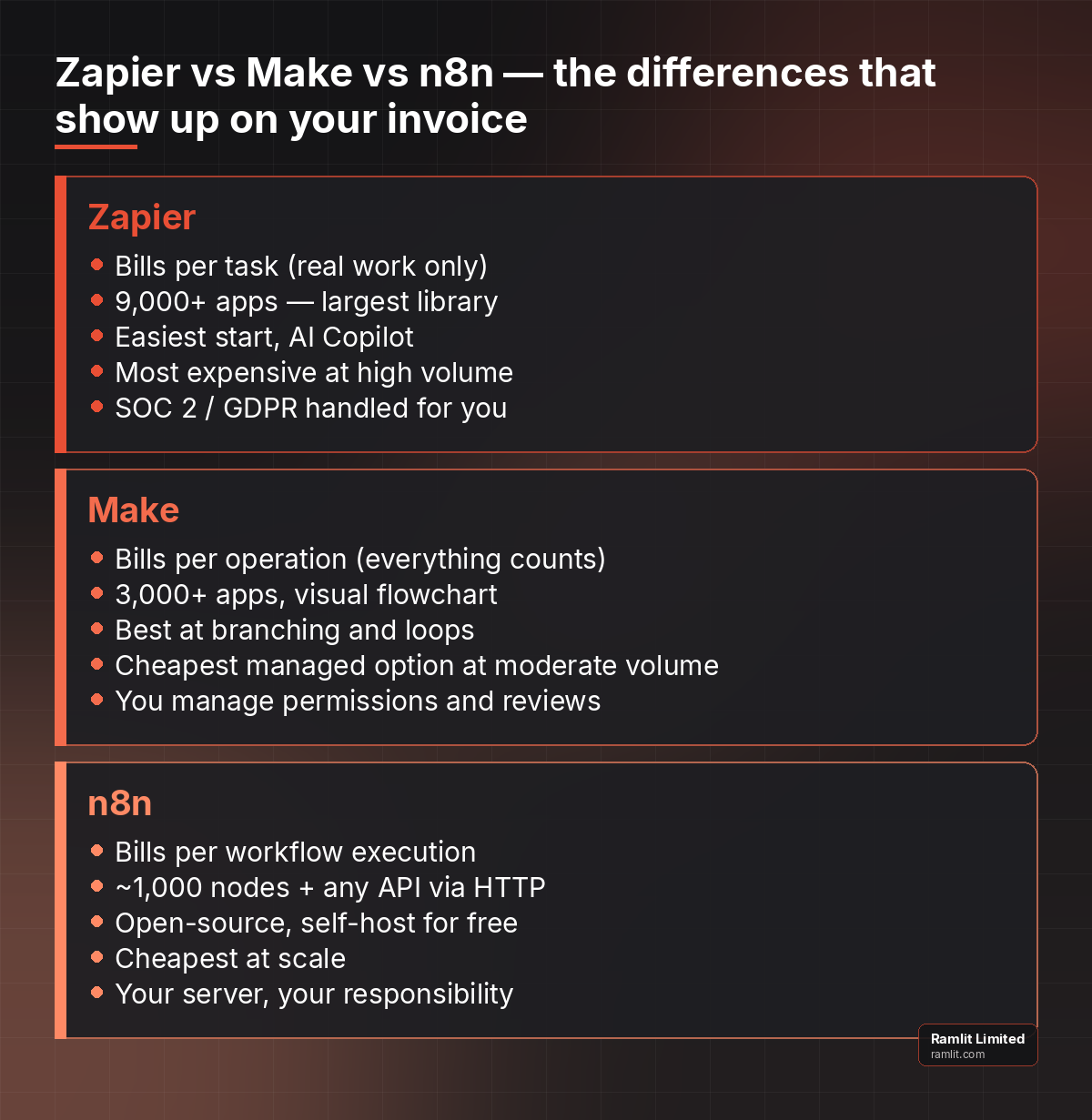 The same automation job, three different philosophies. The billing model is the difference that shows up on your invoice.
The Same Workflow, Three Invoices
Numbers make this concrete. Take a common small-business workflow: a website form is submitted, the lead is added to the CRM, enriched with company data, scored, routed to the right salesperson, and a Slack message is posted. Six steps, and suppose it runs 2,000 times a month.
Zapier counts the steps that change something. The trigger is free, the enrichment lookup, CRM write, score update and Slack post are tasks, the router is free. Call it four tasks per run, 8,000 tasks a month. That sits in the Professional tier's mid range, in the neighbourhood of $100 a month on current tiers.
Make counts every operation, including the polling check and the router. Call it seven operations per run, 14,000 operations a month. That fits a Core plan bumped to the 20,000-credit tier, roughly $20 to $25 a month.
n8n cloud counts one execution per run: 2,000 executions a month, inside the €20 Starter plan. Self-hosted, the subscription is zero and the cost is a small server plus whoever maintains it.
Now multiply the volume by ten. Zapier's bill rises roughly tenfold. Make's rises too, though from a lower base. n8n's Starter plan runs out and Pro at €50 covers it comfortably. At 20,000 runs a month the gap between the cheapest and most expensive option is several hundred dollars a month, and that gap is the real reason engineering-led companies drift toward n8n as they grow.
Ramlit's view: pricing is the second decision, not the first. A €50 plan that nobody on your team can maintain is more expensive than a $400 plan the office manager can fix in five minutes.
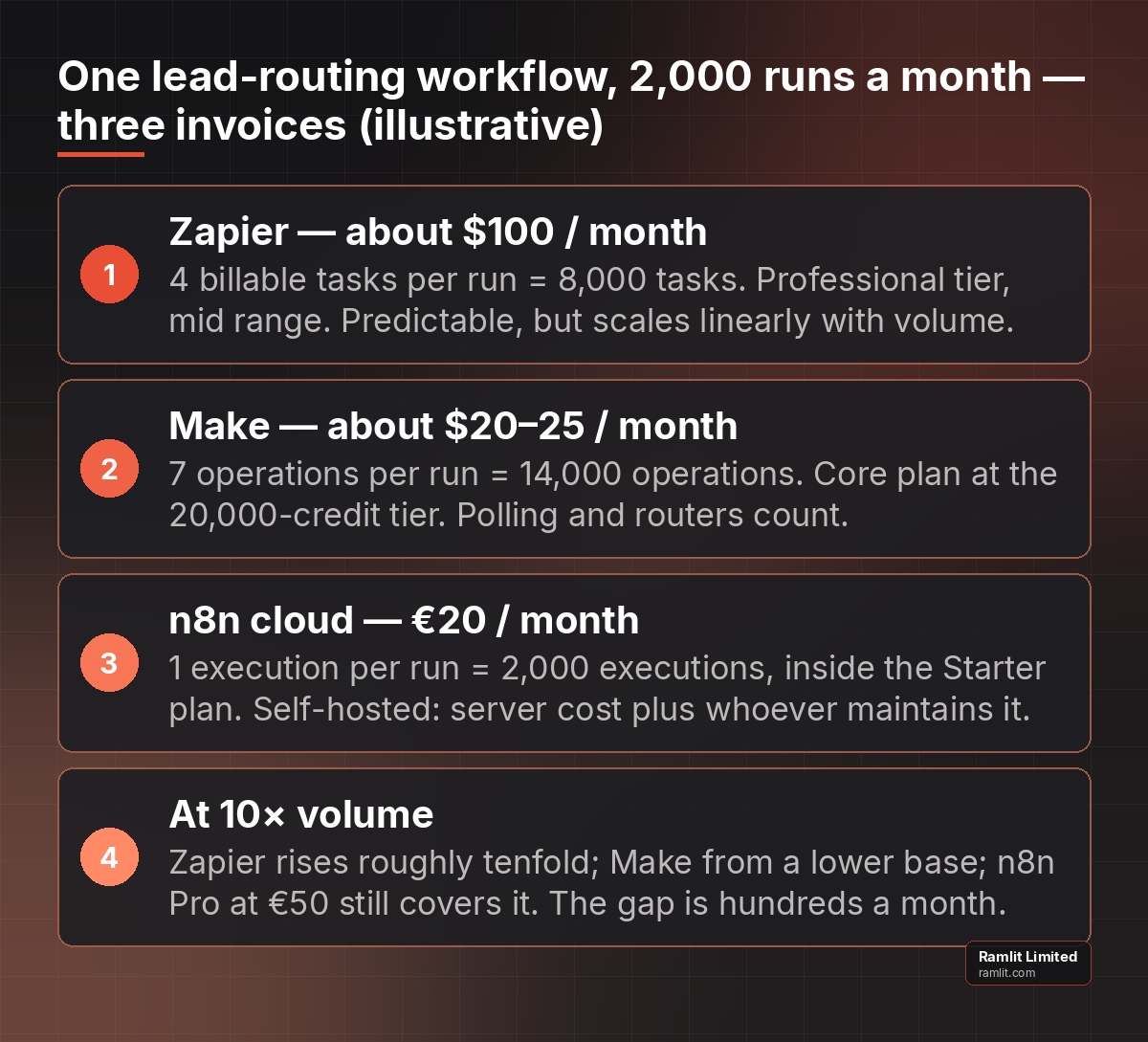 Illustrative monthly cost for the same lead-routing workflow. Volume changes the answer; maintenance capacity changes it more.
Ease of Use: Easy, Normal and Expert Mode
The video's gaming analogy is the most useful one-line summary we have seen. Zapier is easy mode: forgiving interface, instant results, hard to break. Make is normal mode: more control, more to learn, better view of what is happening. n8n is expert mode: full power, and you need the skills to survive.
For a business owner, the practical translation is this. Zapier can be owned by an operations person. Make can be owned by a technically curious operations person with a few weeks of runway. n8n should be owned by a developer, in-house or contracted. If you do not have the owner, do not choose the tool.
Integrations and AI Features
On raw integration count Zapier leads by a wide margin: 9,000-plus apps against Make's 3,000-plus and n8n's roughly 1,000 native nodes. The gap matters less than it looks for two reasons. First, the 200 most common business apps are on all three. Second, n8n and Make both support generic HTTP requests and webhooks, so a developer can reach any service with a public API.
On AI, all three connect to OpenAI, Anthropic and Google models. Zapier has gone furthest in making AI feel native: describe a workflow and Copilot builds it, and you can assemble small agents that take an action, ask for human approval in Slack, then continue. Make and n8n can do the same, but you assemble the pieces yourself. n8n has become popular for exactly that with technical teams, because its AI nodes and self-hosting suit companies that want agents running on their own infrastructure. Ramlit covers that build path in its guide to AI agent development for business automation.
Security: Who Holds the Keys?
This is the section most small teams skip and later regret. With Zapier, compliance is handled for you: the vendor maintains SOC 2 Type II, GDPR and CCPA programmes, and your data passes through their cloud. Make offers comparable managed security with somewhat less oversight tooling, so you manage permissions and reviews yourself. n8n self-hosted gives total control and total responsibility: your server, your patches, your backups, your incident response.
The right answer depends on what flows through the automation. Marketing form submissions can live on anyone's cloud. Patient records, financial transactions or anything covered by a data-residency rule usually cannot, and that alone can decide the platform before pricing enters the conversation.
When None of the Three Is the Right Answer
Ramlit's engineers see a fourth pattern often enough to name it. A business starts on a no-code platform, the workflow grows to sixty steps with nested branches, and every change breaks something. At that point the automation is the product, and it deserves to be built like one: a small service with tests, version control, monitoring and a person accountable for it.
Signs you have reached that point: the same workflow has been rebuilt three times, the monthly bill exceeds a developer day, or a failure in the automation would stop revenue. When those are true, a custom build (often with n8n or a lightweight Laravel or Python service underneath) pays for itself within a quarter. For teams that need this implemented and maintained by an expert team, Ramlit handles exactly this — ramlit.com/services.
What Moving Platforms Actually Costs
Founders often ask whether they can start on Zapier and "just move to n8n later". You can, and Ramlit does these migrations regularly, but it is not a copy-and-paste job. No platform imports another's workflows. Each automation is rebuilt by hand, the field mappings are re-created, the credentials are re-authorised, and the edge cases that were silently handled by one platform's defaults have to be discovered and rebuilt in the other.
A realistic budget for migrating a mid-sized operation of thirty workflows is two to four developer weeks, plus a parallel-running period where both platforms process the same events so results can be compared. The workflows worth that effort are the ones that are revenue-critical or expensive; the rest can stay where they are indefinitely.
Two habits make a later migration cheap. First, document every workflow in plain language: trigger, steps, owner, and what happens if it fails. Second, keep business logic out of the automation platform where possible; a scoring rule that lives in your CRM or a small API is portable, while one buried in a Make router is not. Teams that follow these two habits treat platform choice as reversible, which takes most of the pressure off getting it perfect today.
The Four-Question Decision Test
Answer these in order. Stop at the first clear answer.
- Does regulated or sensitive data flow through it? If yes, self-host n8n or build custom. Managed clouds are out.
- Who will fix it when it breaks? No engineer: Zapier. A technical operator: Make. A developer or a partner on retainer: n8n.
- How many runs a month, and how many steps per run? Under 1,000 runs with few steps: any platform. Thousands of runs with many steps: per-execution (n8n) or per-operation (Make) billing beats per-task (Zapier).
- Is the workflow revenue-critical? If a failure stops orders or onboarding, treat it as software: monitoring, alerts, and someone accountable, whatever platform you choose.
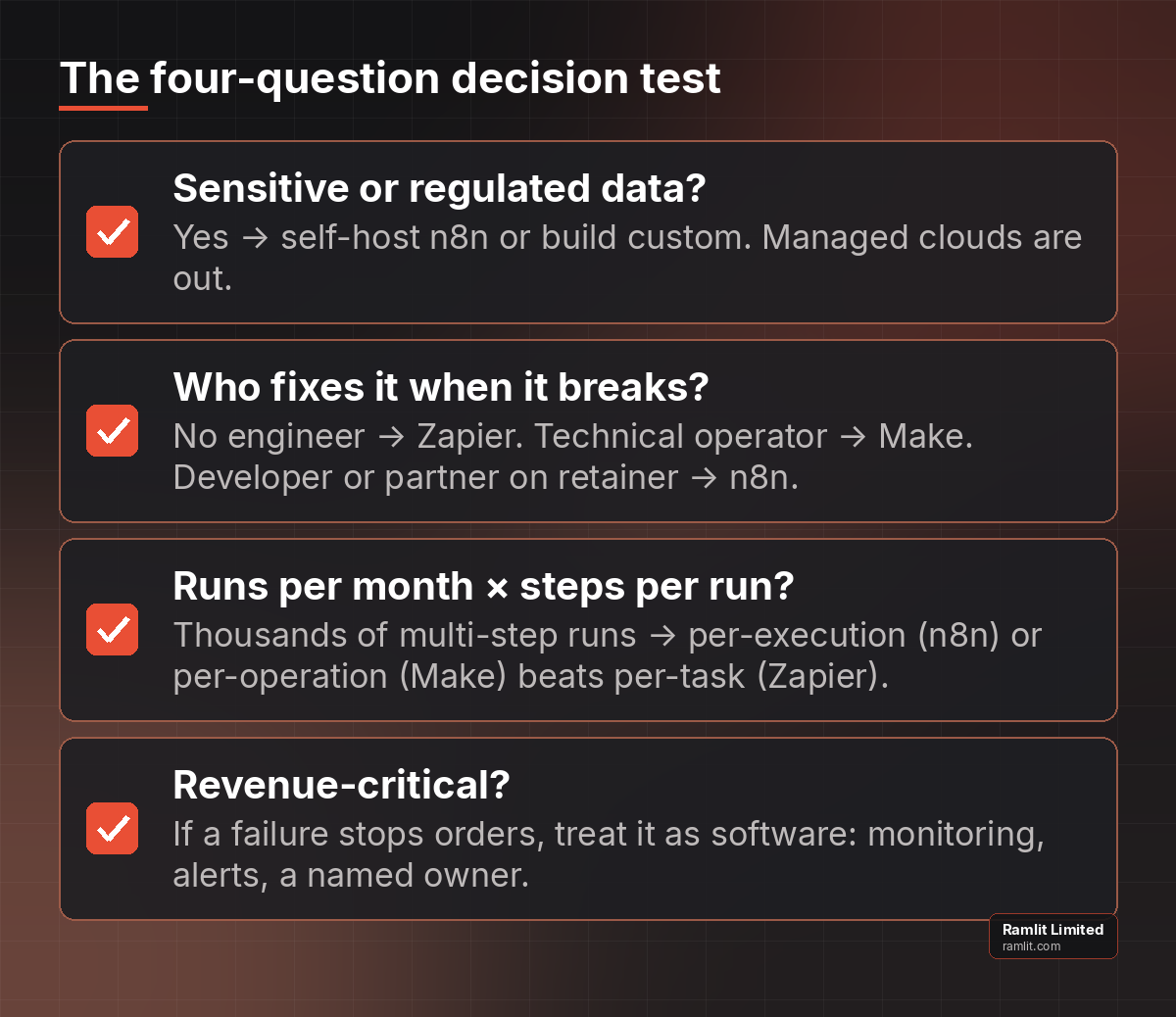 Work down the list and stop at the first clear answer.
Most companies Ramlit works with end up with two platforms, not one: Zapier or Make for the long tail of small conveniences, and n8n or a custom service for the two or three workflows the business depends on. The mistake is forcing every job onto one tool.
What Ramlit Recommends for Growing Businesses
Start on Zapier if you have no technical owner and need results this week. Move the heavy workflows to n8n when volume or data rules demand it, and give that migration to someone who has done it before. Treat Make as the middle path for visually complex, cost-sensitive operations with a capable owner.
Above all, write down who owns each automation. The platform matters less than the person. Ramlit's own content operation, described in its guide to SEO blog automation, runs on a mix of self-hosted workflows and scheduled agents for exactly this reason: the revenue-critical parts are owned and monitored, the conveniences are not.
How to Run a Two-Week Pilot Before You Commit
The cheapest way to settle the zapier vs make vs n8n question for your own business is a pilot, and it does not need to cost anything. Pick one workflow that is annoying but not critical, such as routing new website enquiries to the right inbox. Build it on the free tier of two platforms in parallel, run both for two weeks, and keep a simple log: how long the build took, how many times it failed, how long each fix took, and what the projected monthly bill would be at your real volume.
At the end of two weeks the answer is usually obvious, and it is often not the platform the team expected. Ramlit has watched engineering-heavy teams pick Zapier because nobody wanted to own a server, and non-technical teams pick n8n because a data-residency clause left no choice. The pilot surfaces those constraints early, when changing course costs an afternoon rather than a quarter.
Frequently Asked Questions
Is n8n really free?
The self-hosted community edition is free to run under n8n's fair-code licence. You pay for the server (typically $10–40 a month for a small instance) and for the time of whoever installs, secures and updates it. n8n's cloud plans start at €20 a month for 2,500 workflow executions if you would rather not host it.
Which is cheapest for a small business: Zapier, Make or n8n?
For a handful of simple automations, all three have free or sub-$25 tiers and the difference is negligible. At thousands of runs a month, n8n's per-execution billing is usually cheapest, Make's per-operation billing is next, and Zapier's per-task billing is the most expensive but the most predictable.
Can Zapier, Make and n8n build AI agents?
Yes. All three connect to OpenAI, Anthropic and Google models. Zapier's Copilot and agent features are the most beginner-friendly; n8n is the common choice for technical teams that want agents on their own infrastructure; Make sits between them.
Is Zapier secure enough for business use?
Zapier maintains SOC 2 Type II, GDPR and CCPA compliance and is widely used by regulated businesses for non-sensitive workflows. If your automation carries data that must stay inside your own environment, a self-hosted n8n instance or a custom build is the safer architecture.
Should we migrate from Zapier to n8n?
Only when a specific workflow justifies it: high volume, many steps, sensitive data, or a bill that exceeds a developer day each month. Migrate that workflow, keep the rest on Zapier, and make sure a named person owns the n8n instance.
Ready to Build Your Solution?
Ramlit Limited delivers smart, secure, and scalable tech solutions for businesses worldwide.
- Get a Free Quote: ramlit.com/contact
- Email: info@ramlit.com
- Phone: +880 1723-741224
- Explore Services: ramlit.com/services
Part of the Mejba Ahmed brand family: mejba.me · colorpark.io · xcybersecurity.io